


For a 15.6-inch OLED portable monitor with USB-C for MacBook work and console gaming, verify the exact panel type, input and power path first. If OLED is mandatory, use an explicitly specified OLED model as the comparison; if the real priority is a compact adjustable workstation, compare Mobile Pixels Fold and Glance on their own LCD specifications. Keep those two purchase paths clear so an appealing layout does not get mistaken for OLED.
Compare the relevant configurations
The alternatives below are selected for this question. Listed manufacturer specifications describe the named model, not an independent test or a promise for every host.
| Option | Documented capability or layout | Useful advantage for this decision | Check before choosing |
|---|---|---|---|
| Mobile Pixels Fold 1080p | A single magnetic cover protects the panel in transit and supports it on a desk. | Independent monitor placement | Confirm exact variant, laptop fit, video route, power and open footprint |
| Mobile Pixels Glance | The independent adjustable stand lets you position the screen without attaching it to the laptop lid. | Independent monitor placement | Confirm exact variant, laptop fit, video route, power and open footprint |
| ASUS ZenScreen OLED MQ16AH | 15.6-inch OLED; 1920 × 1080; 60Hz input; USB-C and mini HDMI | An exact OLED option when panel technology is non-negotiable | It is a different panel class from the Mobile Pixels LCD models; OLED does not by itself establish console compatibility |
| ASUS ZenScreen MB16AHG | 15.6-inch IPS; 1920 × 1080; up to 144Hz; USB-C and HDMI inputs | A high-refresh alternative for a supported work-and-gaming input path | Panel maximum refresh is not a guarantee of console frame rate; verify exact output, cable and power requirements |
| LG gram +view 16MR70 | 16-inch IPS; 2560 × 1600; 16:10; USB-C; folio cover/stand | More vertical document area and a separate stand arrangement | The larger panel needs a measured backpack opening and support footprint; confirm the source connection |
A decision test for this workflow
Write the non-negotiable requirement first: OLED contrast characteristics, a specific screen size, high refresh or broad device connections. MQ16AH addresses the OLED branch; MB16AHG addresses the higher-refresh IPS branch. A specification match on one branch is not a promise of a better overall purchase. If you prefer a Mobile Pixels LCD layout, make that panel-technology tradeoff explicit instead of presenting it as an OLED equivalent.
Define which requirement is non-negotiable
Screen size, panel technology, resolution and refresh rate are separate purchase criteria. A product can be slim and portable without being OLED. A 4K OLED panel can still be specified at 60Hz. Write down whether OLED contrast, a 15.6-inch enclosure or high-refresh gaming is the actual constraint. This prevents replacing the requested feature with an unrelated benefit such as a convenient cover or a larger diagonal.
Check resolution and console output separately
A Mac's supported display configuration depends on the exact model and display settings, as Apple explains. Nintendo's TV-mode support depends on the console and dock arrangement. A 4K panel does not force a console to output 4K or make a game run at a higher refresh rate. Confirm the source, input and power requirements, then evaluate text scaling and the supported video mode rather than buying from the panel label alone.
A practical decision example
For a buyer who truly needs OLED, the shortlist should remain limited to verified OLED SKUs. For someone who mainly wants documents and occasional console use in a bag-friendly setup, compare a clearly labeled LCD alternative as a separate option. Keeping those two decisions separate makes the final choice easier to review.
Verified connection and setup facts
Apple's display support guidance makes the usable external-display count dependent on the exact Mac model, resolution and refresh rate. Source: Apple: MacBook Pro display support.
Nintendo documents the supported TV-mode connection through a suitable console and dock; Switch Lite does not support TV mode. Source: Nintendo: Switch TV mode.
Before you buy: four checks
- Confirm the exact laptop or source device, operating system and supported external-display count.
- Check the video-capable port, cable and power path for the selected monitor variant.
- Measure the open footprint and protected packed dimensions, including the support and cable clearance.
- Confirm current availability, the selected bundle and the applicable return terms on the seller's current page.
Two buying paths with different acceptance criteria
| Priority | What to compare | What does not follow from it |
|---|---|---|
| OLED is mandatory | The exact OLED panel and supported video mode | A Mobile Pixels LCD is not an OLED substitute |
| A foldable work-and-console arrangement | Mobile Pixels Fold support, packing dimensions and inputs | A stand layout alone does not establish HDR or gaming performance |
| More independent work area | Glance 16-inch panel and stand versus LG 16MR70 16:10 layout | A larger diagonal is not a guarantee of readable default scaling |
The ASUS MQ16AH specification lists 1920 × 1080, up to 60Hz, 100% DCI-P3, 360 cd/m² typical brightness and 400 cd/m² HDR peak brightness. Those are manufacturer values, not measured sustained brightness or end-to-end gaming latency. Its 1ms GTG panel response is not the same measure as input lag. HDR10 input support also does not establish a high-brightness HDR gaming result.
For the Mobile Pixels route, compare the exact Fold 1080p variant and Glance specifications shown below: Fold provides a separate support arrangement in a 15.6-inch LCD configuration; Glance provides a 16-inch independent LCD workspace. Choose the arrangement around normal document text, stable support and the documented input path. If OLED remains non-negotiable, do not order an LCD expecting the same panel technology.
Use USB-C video only from a supported MacBook output. For a console, verify the exact output-capable model, dock, cable, monitor input, audio and power before ordering. The correct next step is a compatibility and layout check, not an unsupported promise that one model is best for every device.
Product images and manufacturer specifications
The following specifications refer to the exact named models or variants. Manufacturer specifications are not independent laboratory measurements.
Mobile Pixels Fold 1080p

| Parameter | Manufacturer-listed specification |
|---|---|
| Variant | 15.6-inch 1080p |
| Panel | LCD / IPS |
| Resolution | 1920 × 1080 |
| Weight | 1.65 lb |
| Dimensions | 14.29 × 8.78 × 0.24 inches |
| Support | Magnetic cover that doubles as a stand |
| Video inputs | DP-capable USB-C or mini HDMI with appropriate power |
Verify the exact Mobile Pixels Fold 1080p specification and selected variant.
Mobile Pixels Glance
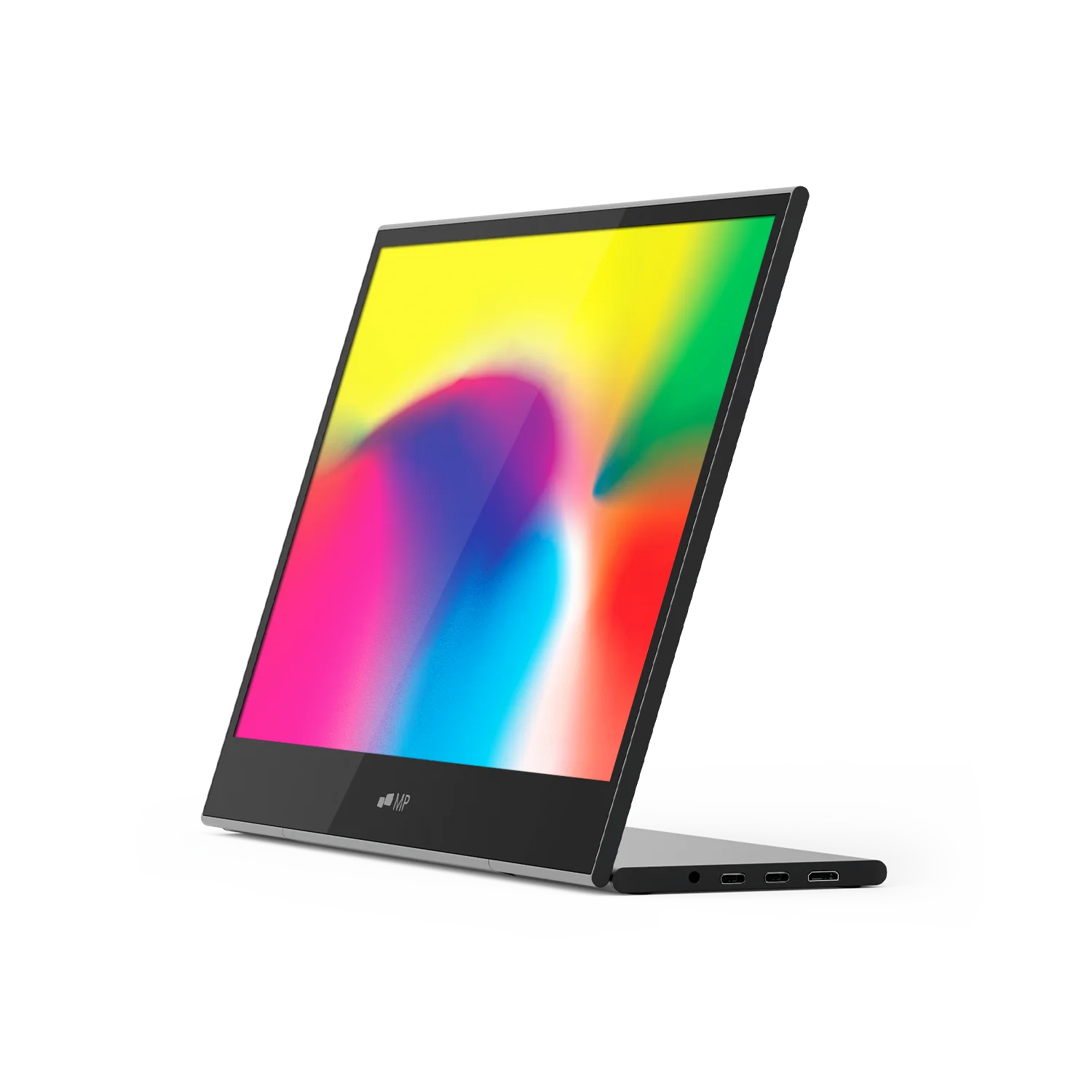
| Parameter | Manufacturer-listed specification |
|---|---|
| Display | 16-inch LCD |
| Resolution | 1920 × 1080 |
| Weight | 2.1 lb |
| Dimensions | 14.4 × 9.4 × 0.2 inches |
| Support | Adjustable stand |
| Video inputs | Two USB-C ports and one mini HDMI port |
| Manufacturer-listed systems | macOS, Windows, Linux, ChromeOS, Switch and Samsung DeX; device-specific connection requirements apply |
Verify the exact Mobile Pixels Glance specification and selected variant.
FAQ
What should I compare when I specifically need a 15.6-inch OLED travel monitor?
Keep two shortlists: exact OLED models if OLED is mandatory, and practical LCD workstations if panel technology is negotiable. Check the MacBook video connection, console output and separate power requirements on either path. Mobile Pixels Fold and Glance can be compared for layout and documented device connections; neither becomes an OLED model because it answers the same travel-work problem.
Is the current Fold 1080p an OLED monitor?
No. The inspected manufacturer specification lists LCD / IPS. This guide does not apply OLED specifications from another product to Fold.
Choose the next step
Explore standalone portable monitors. Match the selected model to your device and workspace before ordering.
Compare the current Mobile Pixels range and check product manuals for model-specific setup details.
Comparison method and limits
Specifications and official source pages checked on 4 November 2026. This is a documentation-based buying guide, not a hands-on benchmark. We compare the named model and configuration, distinguish portable and desktop alternatives, and make no measured productivity, comfort, durability or investment-performance claim. Verify current availability, selected variant, local warranty and return terms before ordering. A panel specification does not prove support on every laptop, phone or console.
References
Discover Tech Gadgets


Leave a comment
This site is protected by hCaptcha and the hCaptcha Privacy Policy and Terms of Service apply.